
Quick Links to the League Dominator User Guide
League Dominator provides personalized fantasy football recommendations based on your league's scoring rules, rosters, and settings. To get the most accurate advice, it's important that this information matches your league host.
Fortunately, League Dominator makes it easy to manage your connected leagues, refresh information from your host, and make adjustments when needed.
In this guide, we'll walk through the Your Leagues section of the main menu, including how to manage your leagues, sync settings, and make manual changes. We'll also cover the general Settings options, including how to customize League Dominator's appearance.
Accessing and Managing Your Leagues
To get started, open the Menu in the upper-right corner of League Dominator and select Your Leagues.
Here, you'll see all your connected leagues, organized by their fantasy football host. You can add new leagues, review basic league information, or select Settings next to any league to make changes.

Syncing Settings From Your Host
When you first connect a league, League Dominator imports its settings automatically. However, if your commissioner makes changes or something doesn't match your league host, you can refresh that information.
From Your Leagues, click Settings next to the league you want to update. Then select Sync Settings From Host.

A window will appear with several categories you can refresh, including scoring, lineups, rosters, teams, and schedules. All categories are unchecked by default, so you can select only the information you want to update. You can also click Select All to refresh everything.
Anything you leave unchecked will retain its current values. This is especially useful if you've made manual adjustments that you don't want overwritten.

Once you've selected at least one category, click Sync Settings. A confirmation message will appear when the refresh is complete.
Note: The regular Sync button found throughout League Dominator's advice pages only refreshes your league's rosters, starting lineups, and opponents. These are the details needed to keep your lineup recommendations current.
To refresh other league information, such as scoring rules or lineup requirements, you'll need to use the Sync Settings From Host option.
Reviewing and Editing League Settings
If you need to make a specific change, you can also edit your league's settings manually. From Your Leagues, click Settings next to the league you want to update.
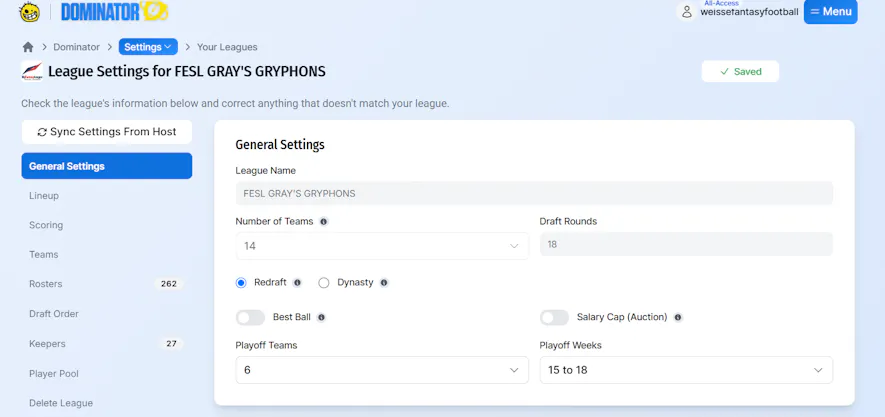
You'll find several categories in the menu on the left side of the screen:
-
General Settings: Review basic league information, including league name, number of teams, Redraft or Dynasty format, Best Ball and Salary Cap options, and playoff settings.
-
Lineup: Adjust your league's starting lineup requirements, including the number of players at each position and any Flex or Superflex spots.
-
Scoring: Review and edit your league's scoring rules, including passing, rushing, receiving, kicking, and defensive scoring. Accurate scoring settings are essential to getting reliable projections and recommendations from League Dominator. We'll cover this in more detail below.
-
Teams: View and manage the teams in your league.
-
Rosters: Review which players are assigned to each team and make corrections when needed.
-
Draft Order, Keepers, and Player Pool: These settings are primarily used by Draft Dominator. Since Draft Dominator and League Dominator now share the same underlying system, these options appear in both tools. However, changes to these settings will not affect your League Dominator recommendations.
-
Delete League: Remove a league from League Dominator if you no longer need it.
Most customers won't need to make manual changes, since League Dominator imports this information from your league host. However, these options give you the flexibility to correct anything that doesn't match or customize settings for your league.
Checking Your League's Scoring Settings
Your league's scoring settings are one of the most important factors in League Dominator's recommendations. Whether your league uses standard scoring, PPR, bonuses, or custom scoring rules, League Dominator needs accurate settings to properly calculate player projections and evaluate your lineup, waiver wire, and trade options.
For most leagues, these settings are imported automatically from your league host, and you won't need to change anything. However, if your league uses unusual scoring rules or you notice that player projections don't look right, this is a good place to check for discrepancies.
Under Scoring, you'll find separate categories for Passing, Rushing, Receiving, Fumbles, Kicking, Kick Returns, Punt Returns, Individual Defensive Players (IDP), and Team Defense. You can review and adjust the rules in each category independently, including editing existing rules or adding custom scoring rules.
You may also notice a question mark (?) next to certain scoring categories. This indicates that League Dominator has flagged a potentially non-standard scoring rule for review. It doesn't necessarily mean something is wrong, but it's worth reviewing those rules to make sure they match your league's scoring system.
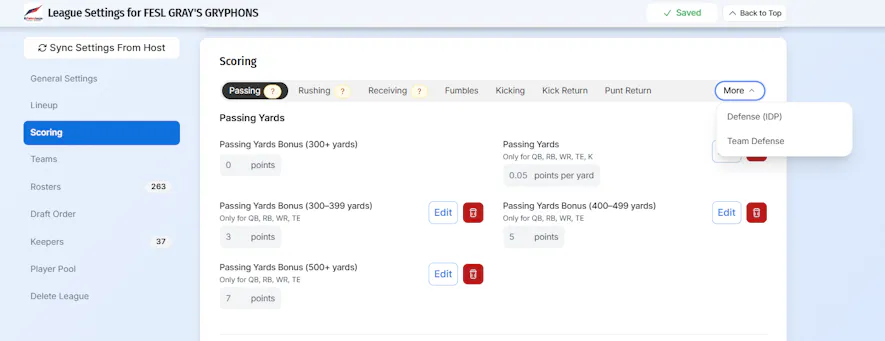
To verify your scoring, compare the rules listed here with those on your league host's website, paying particular attention to custom scoring rules and bonuses.
If something doesn't match, you can try Sync Settings From Host and select Scoring to refresh those rules. If the discrepancy remains, you can make adjustments manually. If you're still having trouble, contact us at help@footballguys.com, and our support team will be happy to help.
Taking a moment to verify your scoring settings can make a significant difference in the accuracy of the recommendations you receive throughout League Dominator.
Customizing League Dominator's Appearance
In addition to managing your individual leagues, you can customize how League Dominator looks. Open the Menu and select Settings to access three display options. These preferences apply to all your leagues.
-
Light and Dark Mode: Choose between Light Mode, Dark Mode, or matching your device's settings. You can also switch between these options directly from the main Menu without opening Settings.
-
Position Colors: Customize the colors used to identify player positions throughout League Dominator, including the Primer and Weekly Rankings. Choose between the Footballguys color scheme, your league host's default colors, or create your own custom color scheme.
-
Colorblind Safe: Enable this option to make charts and labels easier to distinguish. It uses an alternative color palette and adds patterns to certain bars, reducing the need to rely on color alone.
These settings won't change your projections or recommendations, but they can make League Dominator easier and more comfortable to use.

With your league information accurate and your display preferences set, League Dominator can provide recommendations tailored to your leagues in a format that works best for you.
